Needs a Z-pass
Depth of Field
- Reads distance per pixel from your renderer's depth buffer.
- A fast post-process instead of ray-traced depth of field.
- Test any focus setting without re-rendering the 3D scene.
Lenscare by frischluft · depth of field & bokeh plugin
Lenscare creates physically based depth of field and out-of-focus blur in post-production for After Effects, Premiere Pro, DaVinci Resolve, Fusion and Photoshop. Feed it a Z-pass, choose a lens, and change focus without re-rendering your 3D scene.
AE 1.5.5 · OFX 1.5.2 · Apple Silicon native · Multi-Frame Rendering · DaVinci Resolve · Windows, macOS, Linux
Live lens
Click the set to pull focus
Two filters
Lenscare ships two filters. Depth of Field blurs every pixel according to its distance, read from a depth buffer (Z-pass). Out of Focus applies a constant-radius camera blur when there is no depth information at all.
Needs a Z-pass
No depth needed
How it works
Lenscare's Depth of Field filter needs two inputs from your 3D renderer: the sharp beauty pass and a depth buffer. From one distance value per pixel it computes how far each point is from the focal plane, then blurs it with the lens aperture you choose.
Render your 3D scene without depth of field. In frischluft's historic benchmark scene that took 4 minutes instead of 190.
One distance value per pixel. That is all Lenscare needs to know about your geometry.
Set the focal distance, the aperture shape and highlight boost. Change them as often as you like: the 3D scene never re-renders.
Lens aperture
Lenscare's lens aperture control sets the shape of out-of-focus highlights, the bokeh. It simulates several real cameras over a wide range of apertures, and the Out of Focus filter also accepts a custom drawn lens or your own aperture image. Try it in the live lens above.





Shapes rendered with the aperture kernel of the live lens on this page, an illustration of the principle, not Lenscare output.
Highlight boost
Out of focus, the brightest parts of a real image dominate: a lamp blooms into a glowing disc instead of a grey smudge. Clipped formats have lost that energy, so Lenscare's highlight boost restores it before the blur.

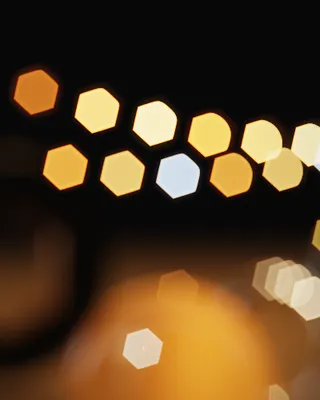
Captured from the live lens on this page, an illustration of the principle, not Lenscare output.
Quality proof
Common depth-of-field filters blur neighbouring pixels regardless of their depth, which leaves an ugly glow where a sharp object meets a blurred background. Lenscare respects depth discontinuities. The archive comparison below, from frischluft's own site, sets Lenscare against the After Effects built-in depth-of-field filter.
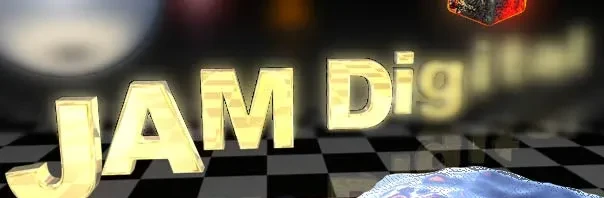
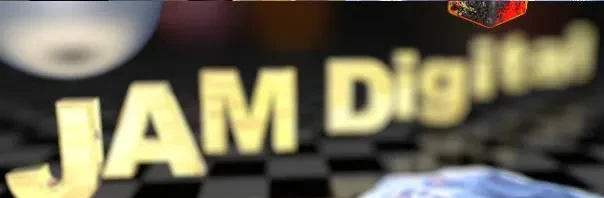
Look at the letter edges: the built-in filter smears the bright type into the floor and background. Lenscare keeps the silhouette clean while the background melts.
Ray-traced and stochastic blurs show noise at low sample counts. Lenscare's depth of field is a deterministic post-process, so there is no grain to fight.
Speed proof
In frischluft's historic benchmark, ray-traced depth of field in the Brazil renderer took 190 minutes. The same scene rendered without depth of field in 4 minutes, and Lenscare added the depth of field in 6 seconds.
* Historic benchmark from frischluft, run on Athlon 1700 and Athlon 1200 machines. Absolute times are dated; the gap between ray-traced and post depth of field is the point.
Hosts & platforms
Lenscare comes in three editions: After Effects (also runs in Premiere Pro), OpenFX for hosts such as DaVinci Resolve and Fusion Studio, and Photoshop for Photoshop-compatible programs. It runs on Windows, macOS with native Apple Silicon support, and Linux.
| Host | Lenscare for After Effects V1.5.5 · $199 | Lenscare for OpenFX V1.5.2 · $239 | Lenscare for Photoshop V1.47 · $89 |
|---|---|---|---|
| Adobe After Effects | Yes | ||
| Adobe Premiere Pro | Yes | ||
| DaVinci Resolve | Yes | ||
| Fusion Studio | Yes | ||
| Nuke and other OpenFX hosts | Yes | ||
| Photoshop-compatible programs | Yes |
Heritage
Lenscare has a long production history in feature film, title and commercial work, from The Orphanage on Sin City to Picture Mill on the opening sequence of I, Robot.
“I don't use raytracer for DOF anymore since I have Lenscare :)”
Pricing
Lenscare for Photoshop costs $89, Lenscare for After Effects $199 and Lenscare for OpenFX $239 (USD, excl. VAT). Every license is single-user with render nodes included free; orders are processed by the reseller Toolfarm.
V1.5.5
Adobe After Effects, also runs in Premiere Pro
$199USD excl. VAT
Buy for After EffectsV1.5.2
OpenFX hosts such as DaVinci Resolve and Fusion Studio
$239USD excl. VAT
Buy for OpenFXV1.47
Photoshop-compatible programs
$89USD excl. VAT
Buy for PhotoshopTry it on your own shots first. The free demo works in demo mode until you unlock it.
Download free demoHonest limits
A depth buffer stores one value per pixel. That is what makes post depth of field fast, and it is also where its limits are.
A mirror or a window has one depth value, but shows things at other distances. Lenscare cannot correctly blur reflections or objects seen behind transparency.
Behind a strongly blurred foreground, say a fence, the background was never rendered. Render such shots in layers and blur each layer separately.
FAQ
Lenscare is available for Adobe After Effects (also runs in Premiere Pro), for OpenFX hosts such as DaVinci Resolve and Fusion Studio, and for Photoshop-compatible programs. It runs on Windows, macOS (Apple Silicon native) and Linux.
Depth of Field uses a depth buffer (Z-pass) to blur each pixel according to its distance. Out of Focus applies a constant-radius camera blur without depth information and adds custom aperture images and background distortion.
In frischluft's comparison, ray-traced depth of field in the Brazil renderer took 190 minutes, while Lenscare produced depth of field in 6 seconds on top of a 4-minute render without DOF.
Lenscare for After Effects costs $199, Lenscare for OpenFX $239 and Lenscare for Photoshop $89 (USD, excl. VAT). Render nodes are included free. A free demo is available.
A depth buffer holds one value per pixel, so reflections and objects behind transparency cannot be blurred correctly, and heavily blurred foreground hides missing background information. For such shots, render in layers and blur them separately.
Download the free Lenscare demo and try it on your own renders and Z-passes.